
Replit Agent
AskZyro PickOne of the most complete AI app-building environments, combining autonomous development with a real code editor, cloud infrastructure and production deployment.
Best for
Entrepreneurs, product managers, developers, startups and non-technical creators who want to build, deploy and maintain functional applications within one cloud platform.
Skip it if
Users wanting completely predictable fixed-price generation, highly regulated or safety-critical systems, and teams that need unrestricted control over their infrastructure from the beginning.
AskZyro may earn a commission from links on this page. Verdicts are independent — disclosure.
Independently researched · Pricing checked 12 August 2026 · 18-minute read
The 30-second verdict
Replit Agent is considerably broader than a basic AI code generator.
It operates inside Replit's complete development and cloud environment, allowing it to plan an application, generate frontend and backend code, configure databases, add authentication, store uploaded files, connect external services, test the application, diagnose errors, create deployment infrastructure, publish the finished product, monitor its operation and continue modifying it after launch.
Read our full verdict ↓Collapse ↑
The current generation, Replit Agent 4, also extends beyond conventional app building. A single project can contain web applications, native mobile applications, designs, presentations, animations, videos, data visualisations and other related artifacts. These outputs can share the same project context, design language, backend and data.
Its main advantage over simpler AI builders is the underlying development environment. Replit does not hide the project behind a proprietary no-code interface. Users can inspect files, open a terminal, edit the code manually, install packages, view logs, manage secrets and use Git. This makes Replit Agent unusually accessible without removing the conventional tools that experienced developers need.
Agent 4 also introduces parallel work. Complex projects can be divided into tasks that run in isolated environments, allowing multiple agents or collaborators to work simultaneously. Completed changes are reviewed before being merged into the main application.
The main weakness is cost predictability. Replit uses effort-based billing rather than charging one fixed amount for every prompt. A complicated request can consume substantially more credits than a simple change. The same credit balance may also pay for application hosting, databases, storage and certain AI integrations.
Replit Agent is therefore extremely capable, but users need to watch the usage dashboard and configure spending limits.
For users who want the easiest possible path to a polished web application, Lovable may initially feel simpler. For users who want a more flexible environment that supports real code, mobile applications, different programming languages and deeper development workflows, Replit Agent is arguably the stronger long-term platform.
4.7
Output quality
4.7
Ease of use
4.2
Value for money
Reviewed by AskZyro Editorial Team · 12 August 2026

What is Replit Agent?
Replit Agent is an autonomous AI development system built into Replit. A user describes what they want in ordinary language, and the Agent carries out the technical work needed to produce it. For example: Build a client portal where customers can create an account, submit an SEO campaign, upload their documents, monitor progress and download completed reports. Replit Agent can interpret the request and create the visual interface, page navigation, registration and login, database structure, file-upload system, customer dashboard, administrative dashboard, server-side logic, API endpoints and deployment configuration. The user can test the result and continue requesting changes through conversation. Unlike a chatbot that only suggests code, Replit Agent can work directly inside the project. It creates and edits files, runs commands, installs packages, starts the application, opens a browser, tests the interface and attempts to correct its own mistakes. What is Replit Agent 4? Replit Agent 4 is the current generation of Replit's AI agent. It was introduced in March 2026 with four main areas of improvement: designing and building in one environment, running development tasks in parallel, supporting multiple types of output, and enabling more structured collaboration. Agent 4 can create websites, full-stack web applications, native mobile applications, data dashboards, AI applications, slide decks, designs, animations, videos, documents, spreadsheets, automated workflows and 3D experiences. Different outputs can exist within one project and share relevant infrastructure. For example, a startup could create a public marketing website, a customer web application, a mobile application, an investor presentation, a product demonstration and an internal analytics dashboard — all within a single Replit project. How Replit Agent works 1. Describe what you want to create The user begins with a written request. A useful starting prompt includes what the product does, who will use it, required pages, required features, data that needs storing, user roles, preferred design, external integrations and intended publishing platform. 2. Agent interprets the requirements Replit Agent determines the appropriate project structure and technology. For a web application, it can configure the frontend framework, backend server, routes, packages, database, authentication, storage, environment variables, development commands and deployment requirements. Users do not normally have to select the technical stack manually. 3. Agent builds the project The Agent creates the files, writes the code and runs the application. It can continue working autonomously for longer tasks rather than requiring the user to approve every small technical action. 4. Agent tests its work Replit Agent can test applications using a browser. It periodically interacts with the application, produces a report, identifies problems and attempts to fix them. Testing may cover whether pages load, whether buttons work, form behaviour, navigation, authentication, visual problems, console errors and failed server requests. 5. Review the checkpoint Agent creates checkpoints that capture completed work. A checkpoint allows the user to inspect what changed, understand the cost, continue from the new version or roll back if the result is unsuitable. 6. Refine the application The user can request further changes through conversation. Examples include creating a less template-like homepage, adding different permissions for customers and administrators, making the mobile menu easier to use, allowing users to cancel subscriptions, adding activity history, finding and repairing errors, or improving loading speed. 7. Publish the result Replit can publish the application using its cloud infrastructure. The user can select a suitable deployment type, connect a custom domain and monitor the live application. Agent modes Replit provides several modes that balance capability, speed and cost. Lite mode is designed for quick, narrowly defined work such as text changes, colour changes, small styling adjustments, straightforward bug fixes and clearly scoped features. Lite tasks commonly finish in approximately 10 to 60 seconds. Economy mode prioritises lower-cost models and efficient everyday development. It is suitable for routine application work, basic features, general iteration and cost-conscious projects. Power mode uses stronger models for difficult work such as complicated features, larger codebases, major design changes, performance optimisation, difficult bugs, architectural changes and longer autonomous builds. Turbo mode is an optional setting within Power mode for Pro and Enterprise users. Replit states that Turbo can produce responses up to 2.5 times faster, but requests may cost as much as six times more than ordinary Power usage. App Testing allows the Agent to operate the application in a browser and inspect the result. It can detect and attempt to repair issues that would not be obvious from reading the code alone. Code Optimisations instructs the Agent to review and improve its implementation while working. This may improve code quality but can increase credit usage. Plan mode helps users structure a feature before modifying the project. Agent can break a project into ordered tasks, identify dependencies, compare approaches, explain trade-offs, review architecture and produce an implementation plan. Plan-mode discussions are billable even when no code is changed. What can you build with Replit Agent? Full-stack web applications: SaaS products, customer portals, marketplaces, directories, booking systems, job boards, community platforms and reporting tools with responsive frontend, backend server, API routes, database, authentication, file storage and production deployment. Native mobile applications: Replit Agent can build native iOS and Android applications using React Native and Expo. These are not merely websites displayed inside a mobile wrapper — React Native renders platform-native interface components. Developers can preview using Expo Go, build a shared codebase, connect to a Replit backend and follow guided App Store publishing steps. Websites and landing pages: Business websites, startup websites, product pages, portfolios, campaign pages, event websites, lead-generation pages and documentation sites. SaaS products: Registration, login, customer accounts, dashboards, database records, usage limits, payments, subscription management, administrative controls, emails and AI functions. Internal business tools: CRM systems, staff portals, order trackers, inventory systems, content-management tools, approval workflows, reporting dashboards and administrative panels. Data applications and dashboards: Business intelligence, performance reporting, financial analysis, marketing analytics, operational monitoring, customer behaviour and database exploration. AI applications: Chatbots, content generation, image generation, document analysis, search, classification, translation, summaries, recommendation systems, voice features and AI agents. Agents and automations: Slack agents, Telegram bots, scheduled reports, email automation, customer-support assistants, data-processing jobs, notification systems and API-triggered workflows. Presentations: Investor presentations, product demonstrations, sales decks, internal reports and training materials. Designs and prototypes: The Design Canvas allows users to generate alternative layouts, compare interface variants, add reference images, import screenshots, manipulate visual elements and apply a selected design to working code. Games and interactive experiences: Browser games, interactive demonstrations, educational games, 3D experiences and puzzles.
What you can do with Replit Agent
Full-stack web applications
SaaS products, customer portals, marketplaces, directories, booking systems, job boards and community platforms with frontend, backend, database and deployment
Native mobile applications
iOS and Android apps using React Native and Expo with shared codebase, Replit backend and guided App Store publishing
Websites and landing pages
Business websites, startup sites, product pages, portfolios, campaign pages and documentation sites
SaaS products
Registration, login, dashboards, database records, usage limits, Stripe payments, subscription management and administrative controls
Internal business tools
CRM systems, staff portals, order trackers, inventory systems, approval workflows and reporting dashboards
Data dashboards
Business intelligence, performance reporting, financial analysis, marketing analytics and operational monitoring
AI applications
Chatbots, content generation, document analysis, translation, summaries, recommendation systems and AI agents
Agents and automations
Slack agents, Telegram bots, scheduled reports, email automation and API-triggered workflows
Presentations
Investor decks, product demonstrations, sales decks and training materials within the same project
Designs and prototypes
Interface variants, reference images, responsive variations and design-to-code application
Key features
Natural-language development
Build and modify software by describing the desired result in ordinary language
Autonomous coding
Agent performs longer sequences of work independently: creating files, changing code, installing packages, configuring services, running commands, inspecting output and debugging errors
Full cloud IDE
Code editor, file browser, terminal, package management, Git, logs, console, secrets, database tools, storage management and deployment controls alongside the AI interface
Design Canvas
Infinite canvas combining interactive previews, visual mock-ups, reference images, design variants and direct manipulation controls
Visual Editor
Direct interface changes without prompts: text, colours, typography, spacing, layout, element size, borders, images and responsive styles
Parallel agents
Agent 4 divides work into independent tasks running in isolated environments; completed changes are reviewed before merging
Kanban task management
Agent tasks appear on a shared board with stages: Drafts, Active, Ready, Done
Team collaboration
Multiple people can join the same project with separate Agent conversations; Core supports 5 collaborators, Pro supports 15
Agent Skills
Reusable instructions, standards and processes at message, project, user or enterprise level
Web search
Agent searches the web for current API documentation, package behaviour, product information and technical troubleshooting
Connectors
Connect to external services: BigQuery, Slack, Notion, Linear, Google Sheets, Excel, Databricks
Replit Database
Managed SQL database with schema creation, tables, application logic and administrative interfaces
Replit Auth
Registration, login, protected routes, user sessions, account data and role-aware functionality
App Storage
Google Cloud Storage-based object storage for uploads, images, documents and generated files up to 2GB
Secrets management
AES-256 encrypted environment variables with TLS in transit; Agent detects keys in prompts and redirects to Secrets
Built-in integrations
Stripe, OpenAI, Anthropic, Google AI, email providers, analytics platforms and external databases
Browser-based testing
Agent operates the application through a browser, records findings and attempts repairs in a reflection loop
Checkpoints and rollbacks
Checkpoints preserve completed states; users can return to earlier versions if changes cause problems
Git support
Commit changes, inspect history, connect repositories, import GitHub projects, push code externally and work with branches
One-click publishing
Replit manages cloud infrastructure, deployment, SSL, public URL, logs and scaling
Custom domains
Connect a domain to Autoscale, Reserved VM or Static deployments
SEO auditing
Replit calculates an SEO score after publishing eligible public web applications and can offer to optimise using Agent
Multiple deployment types
Autoscale, Reserved VM, Scheduled and Static deployments
Private deployments
Pro and Enterprise plans support internal or authorised-user-only publishing
Pricing
Checked 12 August 2026| Plan | Price | Best for | What you get |
|---|---|---|---|
| Starter | $0 | Trying Replit Agent out | Daily Agent credits with monthly cap, Lite builds, Design Canvas, Visual Editor, built-in database, cloud credits, AI-integration credits, one published project, private/password-protected publishing, slides/videos/animations, Replit branding |
| Core | $25/mo ($20/mo annual) | Individuals building complete applications | Everything in Starter plus $25 monthly usage credits, full Agent builds, Lite/Economy/Power modes, Plan mode, connectors, Kanban task planning, up to 5 collaborators, up to 2 parallel agents, unlimited workspaces, unlimited published projects, branding removal, private support requests |
| Pro | From $100/mo ($95/mo annual) | Commercial products and professional teams | Everything in Core plus $100+ monthly credits, up to 15 collaborators, up to 50 viewers, up to 10 parallel agents, more capable models, Turbo mode, private deployments, 28-day database recovery, premium support, exclusive builder community |
| Enterprise | Custom | Large organisations | Everything in Pro plus custom seat limits, SSO/SAML, advanced privacy controls, design-system support, data-warehouse connectors, custom user groups, dedicated support, single-tenant environments, region selection, static outbound IPs, VPC peering, advanced access controls |
Starter
$0
Best for: Trying Replit Agent out
Includes: Daily Agent credits with monthly cap, Lite builds, Design Canvas, Visual Editor, built-in database, cloud credits, AI-integration credits, one published project, private/password-protected publishing, slides/videos/animations, Replit branding
Core
$25/mo ($20/mo annual)
Best for: Individuals building complete applications
Includes: Everything in Starter plus $25 monthly usage credits, full Agent builds, Lite/Economy/Power modes, Plan mode, connectors, Kanban task planning, up to 5 collaborators, up to 2 parallel agents, unlimited workspaces, unlimited published projects, branding removal, private support requests
Pro
From $100/mo ($95/mo annual)
Best for: Commercial products and professional teams
Includes: Everything in Core plus $100+ monthly credits, up to 15 collaborators, up to 50 viewers, up to 10 parallel agents, more capable models, Turbo mode, private deployments, 28-day database recovery, premium support, exclusive builder community
Enterprise
Custom
Best for: Large organisations
Includes: Everything in Pro plus custom seat limits, SSO/SAML, advanced privacy controls, design-system support, data-warehouse connectors, custom user groups, dedicated support, single-tenant environments, region selection, static outbound IPs, VPC peering, advanced access controls
Strengths, limitations & watch-outs
What it does brilliantly
- Complete AI app-building environment with full cloud IDE
- Current Agent 4 architecture with parallel agents and multi-artifact projects
- Builds both frontend and backend
- Supports web applications and native iOS and Android applications
- Creates designs, prototypes, presentations and other artifacts
- Powerful natural-language development
- Long autonomous builds
- Plan mode for structured feature development
- Lite, Economy and Power modes for cost control
- Optional Turbo mode for faster completion
- Built-in browser testing with self-correction loop
- Code optimisation capabilities
- Full browser-based IDE with manual code editing and terminal access
- Git support and GitHub project importing
- Managed SQL database
- Built-in authentication
- Object storage with Google Cloud infrastructure
- Encrypted secrets management
- AI integrations with OpenAI, Anthropic and Google
- External API support
- Cloud publishing with autoscaling infrastructure
- Custom domains with SSL
- Scheduled and private deployments
- Checkpoints and rollbacks
- Visual Editor and infinite Design Canvas
- Parallel AI agents with shared Kanban board
- Multi-user collaboration
- Reusable Agent Skills
- Web search and business-service connectors
- Mobile applications for Android and iOS
- Free starting plan
- Suitable for both non-programmers and experienced developers
- Clearer technical control than many no-code builders
- Production deployment and monitoring
- Spending alerts and budget caps
- SOC 2 Type II certification
- Enterprise SSO and access controls
Where it falls short
- Effort-based pricing can be difficult to predict
- Complex tasks can consume credits rapidly
- Turbo requests can cost up to 6x more than ordinary Power usage
- Plan-mode conversation is billable even without code changes
- Even text-only Agent responses can consume credits
- Hosting and Agent share the same broader credit allowance
- Core credits do not provide extensive rollover
- Pro is expensive for individual casual users
- Free users cannot access full Agent builds
- Generated applications can contain errors
- Agent may misunderstand business requirements
- Self-testing does not catch every problem
- Repeated repair attempts can increase cost
- Design output can occasionally look generic
- Manual refinement may still be needed
- Larger codebases require more careful supervision
- Mobile App Store publication still requires platform accounts and review
- Replit is not responsible for application-specific debugging through support
- Users remain responsible for security and database permissions
- Third-party integrations add separate risks
- Applications may depend heavily on Replit services
- Moving a complete production system elsewhere requires technical knowledge
- Conventional developers may prefer a local IDE
- Internet access is normally required
- Not suitable for safety-critical software without professional oversight
- Public applications may have licensing implications
- AI-generated code may introduce intellectual-property uncertainty
- Cloud usage can create additional charges after included credits are exhausted
What to know before paying
- Core is the logical starting plan for most individuals intending to build a complete application — it unlocks full Agent builds, Power and Economy modes, Plan mode, connectors, task planning, multiple collaborators, unlimited published projects and branding removal
- Pro becomes worthwhile when a user needs multiple simultaneous agents, larger monthly credit allowances, Turbo mode, private deployments, more powerful models, longer database recovery, priority support or a larger team
- Before beginning a large build: define the minimum viable product, use Plan mode for architecture, divide major features into clear tasks, use Lite for small visual changes, reserve Power for complicated work, avoid Turbo unless speed genuinely matters, configure a spending cap, review costs after early checkpoints, commit working versions and test the application manually
- Replit uses one credit system across Agent usage, application publishing, database operations, object storage, AI integrations and other cloud services — heavy Agent activity can reduce the allowance available for operating a published application
- Usage information may take up to approximately 30 minutes to appear in the central dashboard
- The subscription price does not necessarily include unlimited application operation — publishing costs can include compute, requests, outbound data transfer, database usage, storage and AI integrations
Privacy & data
Replit's handling of content depends on the type of account, project visibility and applicable agreement.
Under its commercial agreement, customers retain ownership of their input and own adopted AI output. Replit states that commercial customer content is not used to train machine-learning models except where expressly permitted. Publicly published content may be treated differently. De-identified technical usage data may be used to operate and improve the service.
Under consumer terms, public application content may be used to improve Replit's service, including model development.
Businesses working with proprietary code should use the correct commercial plan, keep projects private, review workspace privacy settings, avoid exposing client information in prompts, confirm contractual requirements, review Replit's Data Processing Agreement and restrict public publishing.
Commercial use
Replit's commercial agreement states that customers own their input and AI-generated output content as between Replit and the customer.
However, users should understand the distinction between private and public projects. Under Replit's consumer terms, code published as a public Replit application may automatically be made available under the MIT Licence. That can allow others to view, copy, modify, redistribute or fork the project. Users building proprietary software should keep the project private and carefully review applicable commercial terms before publishing source code publicly.
Because Replit provides direct access to source files and Git, users can download the project, push it to GitHub, clone it locally, continue development elsewhere and move deployment to another provider. A migration away from Replit Cloud may require recreating its database, storage, authentication and deployment configuration.
Replit provides platform and application-level security including encrypted secrets, secret detection, pre-deployment scanning, Semgrep-powered code analysis, resource isolation, DDoS protection, automatic HTTPS, private deployments, SSO, SAML, SCIM, role-based access controls, single-tenant environments, static outbound IPs, VPC peering and audit controls. Replit reports SOC 2 Type II certification, with stored data using AES-256 encryption and communications using TLS 1.2 or higher.
These platform protections do not automatically make every generated application secure. The user remains responsible for application permissions, database access, secure business logic, user-data handling, input validation, payment security, legal compliance, monitoring, incident response and fixing application vulnerabilities.
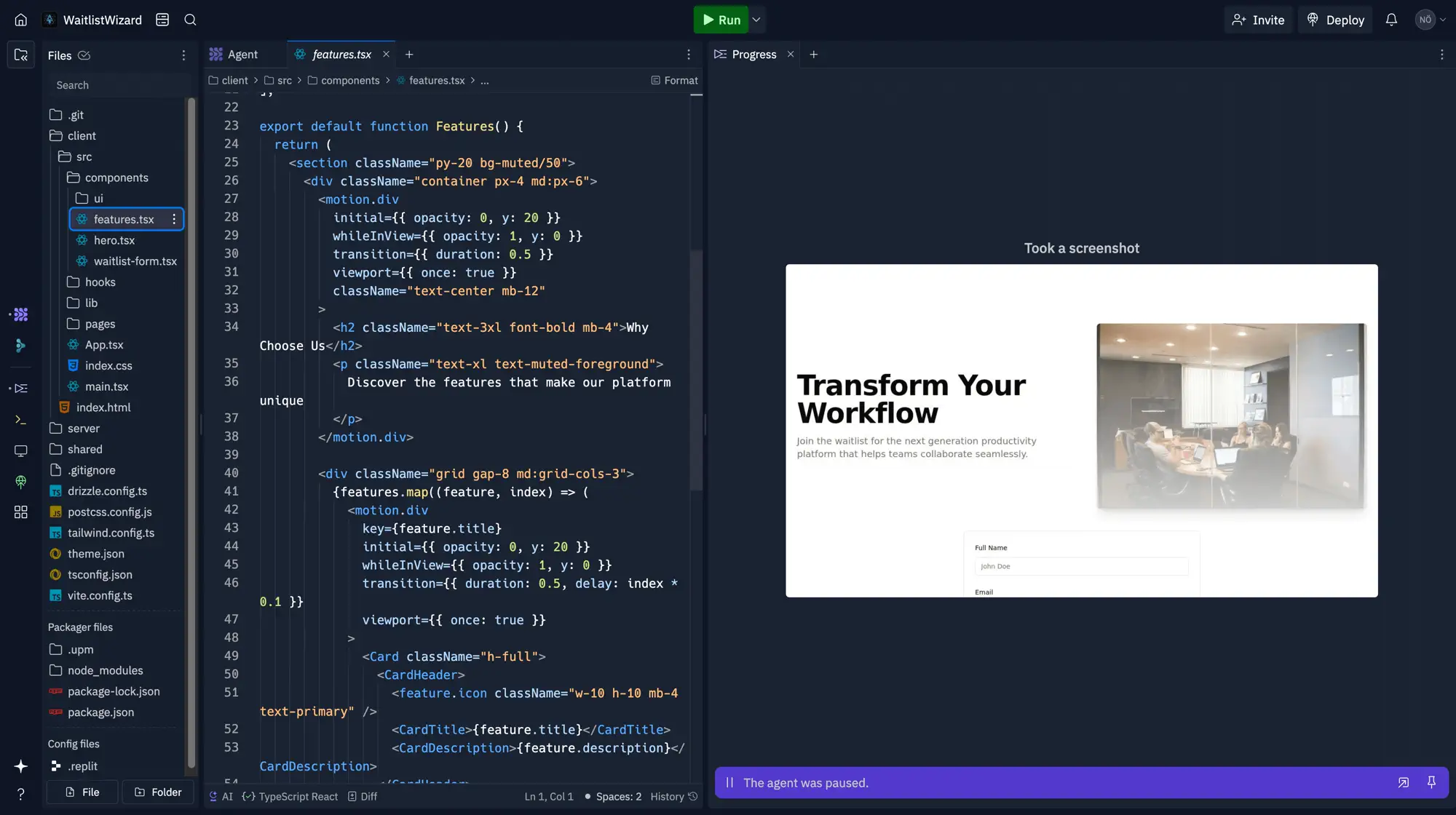
Screenshots & output examples
Alternatives to Replit Agent
| If you need… | Choose | Why |
|---|---|---|
| Accessible full-stack web app building | Lovable | More streamlined and design-led experience for non-technical users wanting polished web products |
| Fast browser-based AI coding | Bolt.new | More visible technical workflow in a lighter browser-based environment |
| Highly managed no-code business apps | Base44 | Abstracts more of the technical system for straightforward business applications |
| React and Next.js interfaces | v0 | Particularly effective at polished React interfaces within the Vercel ecosystem |
| Developer-led coding with AI | Cursor | AI assistance inside a conventional code editor with maximum developer control |
| Terminal-based engineering | Claude Code | Terminal-based coding agent for complex code reasoning and existing repositories |
| Delegated software development | OpenAI Codex | General work agent that operates across repositories, files, documents and broader workflows |
| Autonomous engineering tasks | Devin | Structured around delegating longer software-engineering assignments to an autonomous AI developer |
| Google and Firebase applications | Firebase Studio | Best for applications built around Google and Firebase services |
| Visual no-code applications | Bubble | Detailed visual no-code development with a mature plugin and workflow ecosystem |
If you need…
Accessible full-stack web app building
Choose
Why
More streamlined and design-led experience for non-technical users wanting polished web products
If you need…
Fast browser-based AI coding
Choose
Bolt.new
Why
More visible technical workflow in a lighter browser-based environment
If you need…
Highly managed no-code business apps
Choose
Base44
Why
Abstracts more of the technical system for straightforward business applications
If you need…
React and Next.js interfaces
Choose
v0
Why
Particularly effective at polished React interfaces within the Vercel ecosystem
If you need…
Developer-led coding with AI
Choose
Why
AI assistance inside a conventional code editor with maximum developer control
If you need…
Terminal-based engineering
Choose
Claude Code
Why
Terminal-based coding agent for complex code reasoning and existing repositories
If you need…
Delegated software development
Choose
OpenAI Codex
Why
General work agent that operates across repositories, files, documents and broader workflows
If you need…
Autonomous engineering tasks
Choose
Why
Structured around delegating longer software-engineering assignments to an autonomous AI developer
If you need…
Google and Firebase applications
Choose
Firebase Studio
Why
Best for applications built around Google and Firebase services
If you need…
Visual no-code applications
Choose
Bubble
Why
Detailed visual no-code development with a mature plugin and workflow ecosystem
More code & development tools to consider:
Lovable
Code & Development
Build complete websites and web applications through conversation, with generated interfaces, databases, authentication, payments, hosting and GitHub code export.

GitHub Copilot
Code & Development
AI-powered code completion, chat, agents and code review built into GitHub and popular development environments.
Devin
Code & Development
An autonomous AI developer for delegating coding tasks, creating pull requests and managing local or cloud coding agents.
Cursor
Code & Development
AI-powered code editor with agents, autocomplete, codebase search, debugging, cloud agents and multiple AI models.
Frequently asked questions
What is Replit Agent?+
Replit Agent is an AI development agent that can plan, create, test and publish software from natural-language instructions.
What is Replit Agent 4?+
Agent 4 is the current Replit Agent generation. It adds an infinite Design Canvas, multi-artifact projects, parallel agents, shared task management and stronger collaborative workflows.
Is Replit Agent free?+
Yes. The Starter plan offers limited daily Agent credits, Lite builds and one published project.
How much does Replit Agent cost?+
Core costs $25 monthly or the equivalent of $20 per month when billed annually. Pro starts at $100 monthly or $95 per month annually.
Does Replit Agent require coding?+
No. Agent can create applications from ordinary written instructions. Coding knowledge remains useful for reviewing complex or production applications.
What can Replit Agent build?+
It can build websites, full-stack web apps, native mobile apps, dashboards, AI tools, agents, automations, designs, presentations, animations and other artifacts.
Can Replit Agent build a complete web app?+
Yes. It can generate the frontend, backend, database, authentication, storage and deployment configuration.
Can Replit Agent build native mobile apps?+
Yes. It uses React Native and Expo to create applications for iOS and Android.
Can Replit Agent publish to the App Store?+
It provides a guided workflow for preparing and submitting iOS applications. Apple still controls App Store review and requires the appropriate developer account.
Can Replit Agent build Android applications?+
Yes. React Native and Expo can support a shared Android and iOS application.
Can Replit Agent create a database?+
Yes. Replit provides a managed SQL database that Agent can configure and connect to the application.
Can Replit Agent add user authentication?+
Yes. It can create registration, login, sessions and protected application areas.
Can Replit Agent add payments?+
Yes. It can integrate payment services such as Stripe. Payment workflows must be carefully tested before accepting real transactions.
Can Replit Agent connect to APIs?+
Yes. It can connect external APIs and store credentials using encrypted Secrets.
Can Replit Agent create an AI app?+
Yes. Replit provides supported AI integrations and can also connect external model APIs.
Which models does Replit Agent use?+
The underlying model can vary by Agent mode and capability. Replit uses models from providers including Anthropic, OpenAI and Google.
What is Replit Agent Lite?+
Lite is a quick, lower-cost mode for small changes, targeted fixes and clearly defined features.
What is Replit Agent Economy?+
Economy uses cost-optimised models for routine application work.
What is Replit Agent Power?+
Power uses more capable models for difficult features, larger changes and longer builds.
What is Replit Turbo?+
Turbo is a Pro and Enterprise setting that makes Power-mode work faster, potentially at substantially higher cost.
What is effort-based pricing?+
Effort-based pricing charges according to the work Agent performs rather than applying one fixed fee to every prompt.
Is Plan mode free?+
No. Plan-mode conversations use credits even if Agent does not modify the code.
What is a Replit checkpoint?+
A checkpoint records the completed state of an Agent task and can be used to inspect or roll back the work.
Do Replit credits roll over?+
Core monthly credits normally do not roll over. Eligible Pro credits can roll over for one month.
Does hosting use Replit credits?+
Yes. Publishing, databases, storage and AI integrations can use the same broader credit allowance.
Can I set a Replit spending limit?+
Yes. Replit provides alerts, budgets and hard limits to reduce unexpected charges.
Can I use a custom domain?+
Yes. Custom domains are supported for eligible published applications.
Does Replit provide SSL?+
Yes. Replit provides HTTPS and manages TLS certificates for published applications.
Can I export Replit code?+
Yes. Users can access their source code, use Git and move the code to another development or hosting environment.
Do I own code generated by Replit Agent?+
Commercial customers own their adopted AI output as between themselves and Replit. Public projects can be subject to the MIT Licence, so proprietary projects should remain private.
Can Replit Agent work with GitHub?+
Yes. Replit can import repositories and use Git-based version control.
Is Replit suitable for production?+
It can host production applications, but generated code must be tested, secured and monitored. Critical applications require professional review.
Is Replit secure?+
Replit provides encrypted secrets, security scanning, HTTPS, resource isolation and enterprise controls. The application owner remains responsible for application-level security.
Is Replit Agent better than Lovable?+
Replit provides greater technical flexibility, native mobile support and deeper development tools. Lovable may be easier for non-technical users focused primarily on polished web applications.
Is Replit Agent good for beginners?+
Yes. Beginners can describe an application without coding, but they should learn basic concepts around databases, permissions, testing and deployment before operating a serious product.
Reviewed by AskZyro Editorial Team
We assess AI tools for output quality, ease of use, pricing, practical value and limitations. Where possible, we test tools directly and verify product and pricing details with the provider.
Last reviewed: 12 August 2026
Still unsure which code & development tool fits you?.
Tell AskZyro what you build, how you work and your budget. We'll help you choose — plus 70+ free tools built in.
Find my toolDisclosure: links to Replit Agent on this page may be affiliate links. If you sign up through them, AskZyro may earn a commission at no extra cost to you. This never affects our verdict.